Blog

December 12th, 2011

Despite the real threat of hacking and online thievery, a lot of small businesses do not consider themselves affected by it, says a report by StaySafeOnline.org. While dependent on their computer systems for data storage, few realize that all it takes is one breach to destroy a cultivated relationship with clients and the company's own financial status.

StaySafeOnline.org, a website of the National Cyber Security Alliance, has recently released a study that chronicles the cyber security practices and attitudes of small businesses. Conducted in partnership with Visa, the study shows some interesting, if not disturbing, results.

It turns out that many small businesses (about 65% of the respondents) are highly dependent on their computer / IT / data systems, where they store important information, from sensitive company financial records to personal client information such as credit card info, addresses and phone numbers, and more. However, as many as 85% believe that they will not be targeted by hackers and online thieves, and less than half have data security systems in which they are confident. In general, small businesses have, at best, a mediocre security system.

Few realize, though, that it only takes one breach to compromise a company's finances and relationships with clients. And if you have less than stellar security, stealing from you is easier. You might not have as many online assets as big businesses, but hackers can make a hefty profit by victimizing several easy marks as opposed to bigger and riskier efforts with more secure systems of larger firms.

Don't take a risk with important data, and don't compromise the relationships and reputation you've built with your clients over the years. Good security is always worth it. If you're interested in knowing more about beefing up your security through company policies, software, and user education, please don't hesitate to contact us. We'd be happy to sit down with you and discuss a security blueprint that's cost effective and custom built to meet your specific needs.

Reference: National Small Business Study

Published with permission from TechAdvisory.org. Source.

Topic General Tech
December 7th, 2011

Many companies are now well into 2013 and have started to get into the grove, so to speak. New new opportunities and potential changes to the way companies operate have started to emerge, however the year is still young. The question many are asking is, "What tech based marketing trends can we expect in 2013?"
Here's an overview of what we think will be the five biggest tech-marketing related trends of this year.

1. Increased mobile demands With a crop of excellent, affordable and capable devices released this past year, it's a sure thing that many of your clients will be getting new devices for christmas. This will result in an increased demand for mobile friendly sites that are simpler, lighter on text and more interactive. 2013 will be a good year to review your website and optimize it for mobile users.

2. Increasing local demand With the increasing adoption of mobile devices many users are changing the way they use the Internet. Computers and laptops are increasingly being used for general searches while mobile devices are used almost exclusively for local searches. If you don't have a local presence that's optimized for local searches (e.g., Google Places) you will be missing out.

This 'localization' trend is referred to as SoLoMo (Social-Local-Mobile) and is the idea of businesses adding local information to their online platforms to capitalize on the increase of mobile users. 2012 has seen many companies begin to really use this by pushing locally oriented ads to mobile users. It's highly likely SoLoMo will become even more integral in 2013.

A recent infographic from Monetate highlights the importance of SoLoMo and how mobile users shop. The most interesting finding in relation to local search is that many customers use their mobile device to find out what's around them, and then will purchase either in-store or online. This trend should continue well into 2013.

3. Apps with better mobile ads Let's face it, smartphone users have gone app crazy. In the past few years many of the apps have come to include mobile ads shown to customers. Many of these ads aren't targeted to the user, but this is slowly changing as ads that are shown are becoming more trustworthy and targeted. There should be an increase in both the number of click-throughs and apps through 2013 which means it may be the perfect time to either develop your own app or invest in app advertising.

4. Increasing adoption of new payment methods The way customers pay for their purchases is changing. With the steady adoption of NFC (Near Field Communication) technology, mobile payment systems like Google Wallet, and coupon systems like Apple's Passbook, 2013 should see a shift away from paper and plastic to electronic.

This has already started with huge companies like Starbucks announcing they will be launching payment services provided by Square which allows for mobile payment. It's not hard to see that 2013 will be a big year for mobile based payment.

5. More mobile marketing competition With the general increase of mobile adoption it makes sense that 2013 will likely see more companies looking into mobile related marketing. This will make this medium a little more crowded and competitive. What this equates to is that companies should move to take advantage of mobile related marketing, or at the very least take steps to optimize their processes for mobile.

All signs point to 2013 being a year of mobile oriented advancements. Indeed, most of the customer/consumer oriented tech advancements of the past two years have almost been exclusively mobile oriented. Mobile adoption and the data that comes from the different advancements and trends should be something companies factor in when they are making operational decisions for the coming year. If you would like to learn more, please contact us.

Published with permission from TechAdvisory.org. Source.

December 5th, 2011

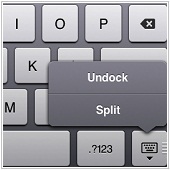
Did you know that on iOS5 on the iPad, you can actually split the keyboard into two? This can be useful for typing with your thumbs if you are holding the iPad with both hands.

To do so, press and hold the keyboard icon on the on-screen keyboard. An option will appear, allowing you to split the keyboard into two. Alternatively you can drag the keyboard icon up across the screen until the keyboard splits up. Still another way is to simply put two fingers around the center of the keyboard and simultaneously drag them apart in a splitting motion.

Published with permission from TechAdvisory.org. Source.

Topic Tech Tips
November 28th, 2011

While Facebook may be an invaluable tool for businesses to expand their company reach and marketing strategies, it is also important to note that with Facebook's popularity comes the larger risk of encountering scams designed to collect personal information and/or phish for important data. Having the right security know-how and software is essential for those who wish to prevent themselves from becoming the next victim.

As more and more people continue to use Facebook both for personal and business purposes it seems to follow that all sorts of unscrupulous individuals and groups will find ways to exploit this popularity for their own illicit benefit.

In the same way people are phished through email, hackers and scammers use similar techniques to fool Facebook users into falling for their tricks. The combination of curiosity and trust is what hackers rely on to make users fill in contact details for non-existent promotions, visit suspicious websites, or download fake software, all through Facebook. While Facebook has instituted some additional security measures to counter this threat, the consensus is that it is a generally lukewarm, or even cursory response to the issue.

What makes it worse is that you aren't usually the first victim – those links and whatnot appear on your News Feed courtesy of a contact who has fallen into the same trap. So always be wary of events or promos your contacts invite you to join.

The most important thing is to have both the right knowledge and software to prevent getting scammed not only on Facebook, but anywhere else on the Web. Facebook is just a new medium for scammers and hackers to steal information and data and they'll do the same thing once the next big thing on the Web comes along.

If you want to know more about Facebook scams and how you can better protect yourself both through training and the right software solutions – please feel free to give us a call so we can help you set up a more secure system for your business that's custom-built to meet your specific needs.

Published with permission from TechAdvisory.org. Source.

Topic General Tech
November 25th, 2011

Want to do a quick currency conversion? You can use Google for that. Simply type in the amount in the original currency, then the currency you want to convert it to.

For example, type in: "100 dollars in yen" or "100 dollars in Mexican Pesos" and check out the results. If you have a mobile data plan on your mobile phone with a browser, you can use this tip for quick currency conversions on the go.

Published with permission from TechAdvisory.org. Source.

Topic Tech Tips
November 21st, 2011

If you're a small or medium-sized business that's still hesitant about Managed Services, you're missing out on a lot. Some of the advantages of using Managed Services include better control of costs and a more comprehensive and up-to-date IT system that's dependable, stable and allows you to comply with regulatory compliances.
Many large businesses prefer the use of Managed Services to meet their IT needs, but many smaller organizations continue to be skeptical of this solution. Here are five reasons that will make you think twice about dismissing Managed Services:

Managed Services help control costs. In any kind of business, it's important to be as cost-effective as possible. Especially in IT, where unbridled or poorly managed systems cost way more that they're worth, it's essential to have a system that works with your budget but doesn't compromise on quality. Managed Services is the most feasible and practical way to accomplish that, especially in the long term.

Managed Services help you deal with increasingly complex IT solutions. With both hardware and software components of IT systems constantly evolving, businesses with limited resources may very well find themselves left behind after a while. But with Managed Services, you are able to enjoy the advantages of the latest IT solutions at a fraction of the cost – enabling you to provide the best possible service to your clients.

Managed Services give you a better, more dependable IT infrastructure. Especially for smaller businesses, it can be tedious to maintain an in-house IT arm; and you run the risk of stretching resources too thinly, which can compromise the quality and output of your IT department. Managed Services allow you to have a stable and dependable IT arm that's dedicated to meeting your specific needs in a cost-effective manner.

Managed Services offer more comprehensive and complete IT solutions. More often than not, small and undermanned IT departments are more of a burden to the organization they belong to – errors are more likely to occur, response and problem solving is a slow process, and staff members are probably overworked and underpaid, making them both unhappy and less productive. Managed Services, on the other hand, are completely the opposite, allowing you to utilize efficient and comprehensive solutions that are tailor-made to fit your specific requirements.

Managed Services help you maintain compliance. With the marketplace becoming more and more competitive, meeting different regulatory compliances has become a fundamental need. From Sarbanes-Oxley to the Health Insurance Portability and Accountability Act (HIPAA), smaller companies can often find themselves lost. It's Managed Services that helps these companies not only fully understand the requirements of these regulations, but also comply with them.

If you want to know more about how Managed Services can directly benefit your day to day operations, please do not hesitate to give us a call – we'd be happy to sit down and discuss a custom solution that works for you.

Published with permission from TechAdvisory.org. Source.

Topic General Tech
November 18th, 2011

The Mac introduced the concept of using multiple "Desktops" (previously called "Spaces") using Lion's Mission Control application. Using Mission Control, you can specify which desktop applications will automatically open in which desktops by default.

To set your preferences, select and right-click (or ctrl+click or two-finger click) on an application in the Dock, then select the "Options" menu in the resulting pop-over. Inside that menu, links appear that allow you to remove the app from the Dock, open it at Login, or to have it Show in the Finder app. If you have multiple desktops active, an additional set of options will appear at the bottom. Here you can "assign" the app to "This Desktop" or the current active desktop, or to open in "All Desktops" or "None." Make your selection and your app will now open in the specific Desktop or Desktops you specify on launch.

Published with permission from TechAdvisory.org. Source.

Topic Tech Tips
November 14th, 2011

AndroidPhone_Apr10_BThere are a wide variety of reasons the smartphone has become an integral part of any business owner's daily life. One of the biggest is that these devices are functional, largely due in part to the multitude of apps available that can help make our lives just a little bit easier. If you have an Android phone, here's one app that could help you while making calls.
Call Notes is an app for Android that adds notes to the phone interface while you are making a call. When you receive a call the note, which you can attach to the caller's profile, is shown on the screen under their picture or the call icon. The note can be moved anywhere on the screen and edited during the call if you purchase the Pro version.

Why is this app useful? If you make business calls on your Android device and would like to have some information about the caller on hand, this app could be a good tool. The Pro version also allows users to add a company name and a title which can also help. Being able to create notes while in a call is also useful. For example If the caller says something, or you agree on something and you don't have any paper handy you can add a note.

How does it work? You can download either the free or Pro version from Google Play and install it on your phone. To add a note to a contact you:

  1. Open the app and select Edit Note.
  2. Scroll to the contact you would like to add a note to and tap on their name.
  3. Tap on the empty black area and your keyboard should pop up. Enter the note and press Save.
  4. The note should show up the next time you call/receive a call from that contact.
If you get the pro version, you can enable the editing of messages during a call by opening the app and selecting Settings followed by Buttons. Tap on Edit note button so that the box is ticked and you will be able to edit notes during the call.

Another interesting feature is you can add a button to the note that will enable you to easily access your phone's calendar during a call. This can be a great help, in that you can easily schedule a meeting while on the call. To add the calendar button to a call note: Open the app and press Settings. Tap on Buttons and select Calendar button from the menu that opens.

This is just one of the numerous functionality based apps that can be added to make your Android phone even more useful. What are your favorite business oriented apps? Let us know. And if you're looking for more information on how an Android device can be used to improve your job, contact us today.

Published with permission from TechAdvisory.org. Source.

Topic General Tech
November 11th, 2011

If you use an iPad, there is a switch conveniently located at the right side of the device which you can set to either lock the orientation of the screen or to mute the audio when you slide the switchdepending on your preference.

To set your preference, go to Settings > General, and under the "Use Side Switch" section, choose either "Lock Rotation" or "Mute."

Published with permission from TechAdvisory.org. Source.

Topic Tech Tips
November 4th, 2011

As hackers and cyber-thieves begin to target and steal from smaller businesses through their online banking systems, experts are urging organizations and businesses to strengthen their security systems so that their finances can be kept safe.

Online banking is a tool that many businesses utilize because of the ease, efficiency, and convenience it offers. Especially when it comes to small and medium-sized businesses, online banking is a great way to manage and track finances for day-to-day operations.

However, the increase in online banking also has the unfortunate effect of luring unsavoury parties such as cyber-thieves and hackers who target and steal from the businesses who use it. This is why security experts are urging companies to beef up their security systems to keep them safe from cyber and identity theft. The more companies rely on the internet, especially when it comes to managing finances through online banking, the more prudent it is to take steps to prevent that hard-earned money from being stolen.

One tip experts give is to establish proper protocols for transacting with the bank, such as requiring two people to verify a transaction before it is approved. This helps create a checks-and-balance system that hackers will be hard-pressed to get around. Having a dedicated workstation used for only online financial transactions is also recommended, as this lessens the likelihood of it being infiltrated by Trojans, viruses, spyware, and other malware that may come from the machine being used for other purposes. Having the right anti-virus and anti-malware software as well as regularly updating it can also go a long way in keeping your online banking transactions safe from unfriendly eyes.

Your finances are the lifeblood of your business, so if you are interested in how you can make your online banking experience safe and secure, we'd be happy to sit down with you to discuss security solutions that are tailor-fit to your specific requirements and needs.

Published with permission from TechAdvisory.org. Source.

Topic General Tech